
 for Windows 11, 10, 8, 7, Vista, XP, NT, and 200x
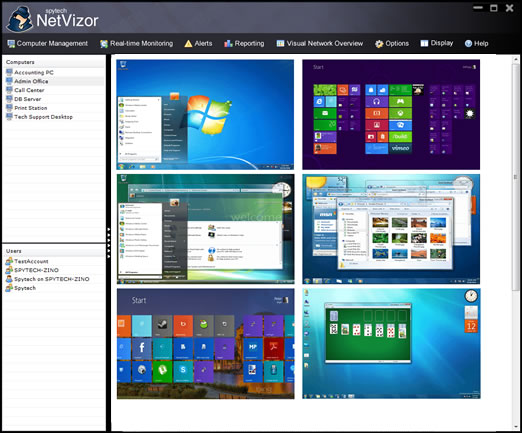
NetVizor has a very large list of features. Below is a list of NetVizor's extensive features, organized by category for easy browsing. Click on a category to view its feature-set.
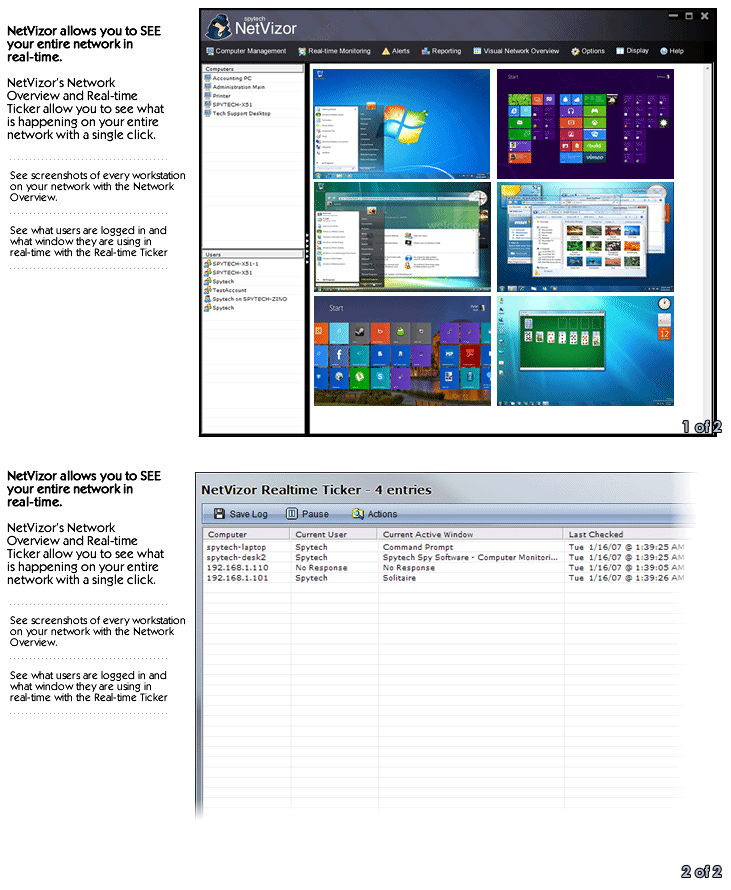
NetVizor allows you to quickly, and easily view what is happening in real-time on your entire network with a single click. Connecting to each specific workstation just to see what the remote users are working on is no longer necessary.
- Real-time Activity Ticker
View an auto-refreshing list of all the computers on your network detailing who is logged in to each computer at that moment, and view what window they have open and are using at that time, as well as take-over the desktop of the computer.screenshot
- Visual Network Overview
Launch a visual network overview that shows you thumbnail screenshots representing each computer on your network at that moment. Each thumbnail links to a full size image of the remote computer's desktop.screenshot
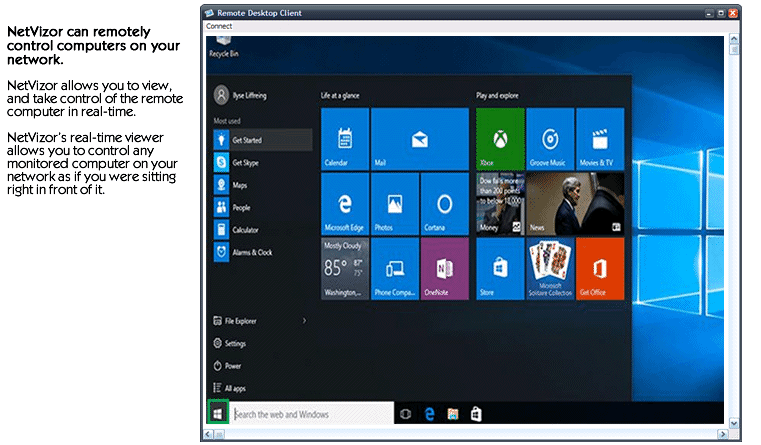
- Real-time Desktop Viewing and Control
Launch remote control sessions with computers on your network. NetVizor allows you to take control of the mouse and keyboard of any monitored computer on your network from one central location.screenshot
NetVizor's logging capabilities are unmatched. NetVizor can log anything from what the user types, to emails sent/received and programs they ran - all time stamped by date for easy viewing. All logs are easily saved and exported for later use. All of NetVizor's logs can be remotely viewed from a central location for easy activity management!
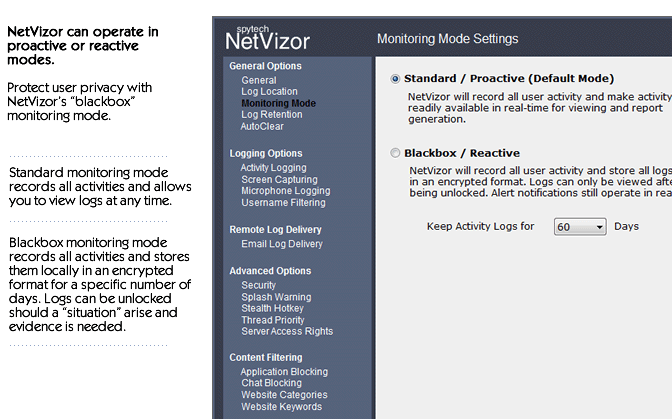
- Proactive and Blackbox/Reactive Monitoring Modes
NetVizor can operate in proactive or reactive monitoring modes. NetVizor's standard/proactive monitoring mode can record all user activity and allow you to view logged data immediately as activities occur. The blackbox/reactive mode records everything and stores logs locally on the monitored computer in an encrypted format for a set number of days, which are only viewable after being unlocked.screenshot
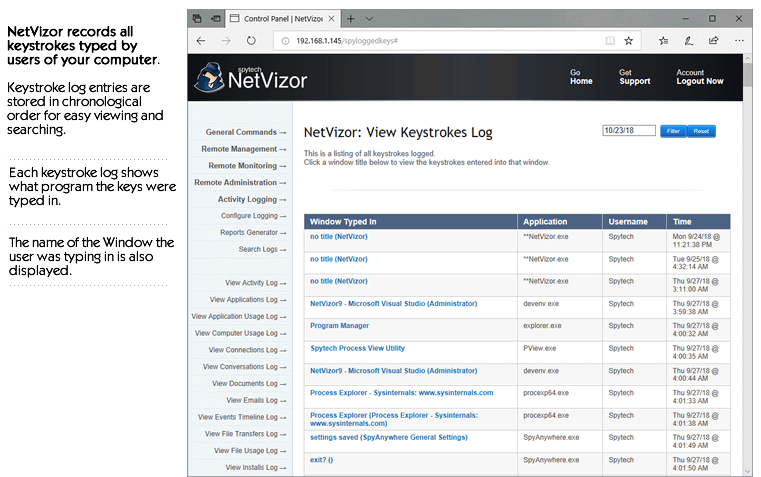
- Keystroke Monitoring
Monitor and log all keystrokes along with the window they are typed in and time stamp.screenshot
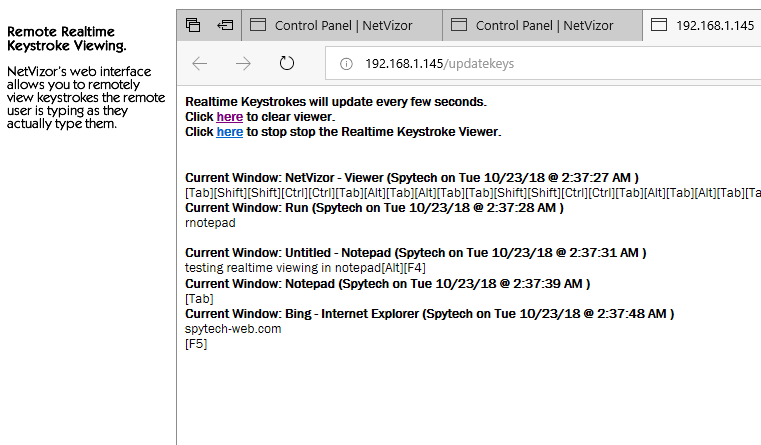
- Remote Real-time Keystroke Viewing
View what users are typing in real-time as they type! NetVizor's real-time keystroke viewer will show every keystroke they type, as they type it, and categorize each keystroke under the window they type it in.screenshot
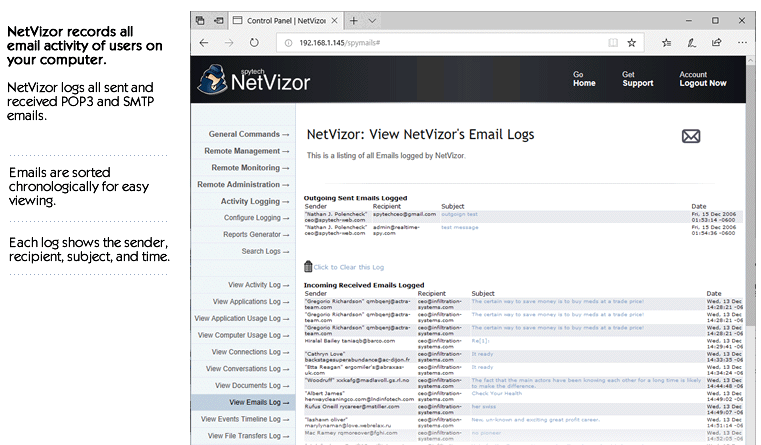
- Emails Sent and Received
Monitor and log all emails sent and received by users of your computer! All SMTP and POP3 messages are recorded for later viewing.screenshot
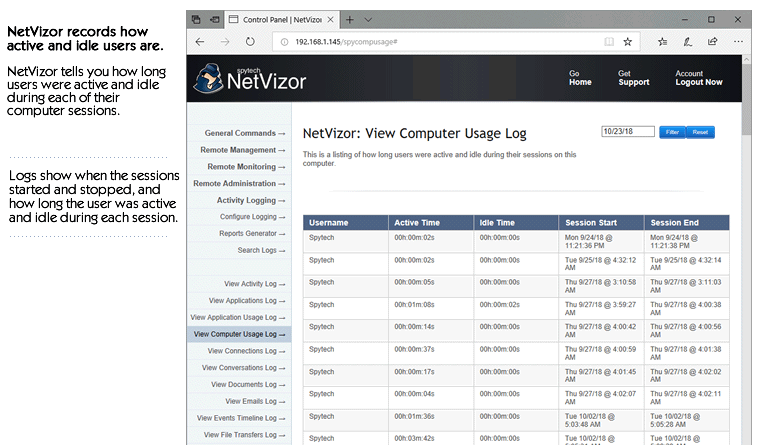
- Computer Usage Logging
Log how long users are active, and inactive during each computer session. Logs include when each session started, and when it ended.screenshot
- Events Timeline Logging
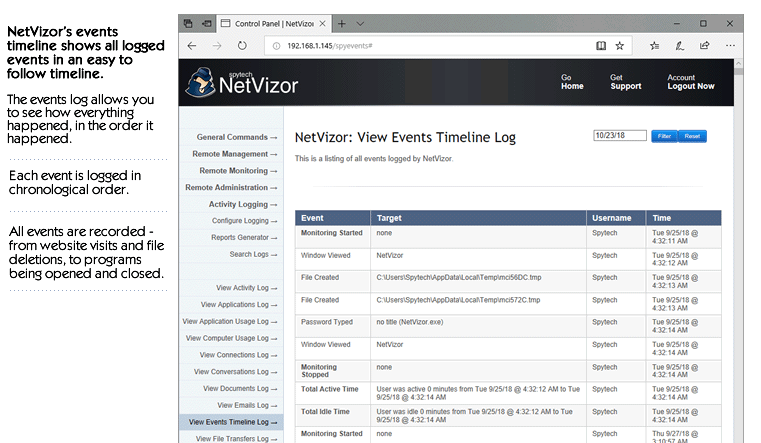
Log all events users performed and view them in an organized chronically ordered listing. The Events Timeline lets you view what the events the user performed, in the order they did them. Events logged include Program Starts/Stops, Website Visits, Document Viewings and Printings, how long users were active and idle each session, and more.screenshot
- Application Usage
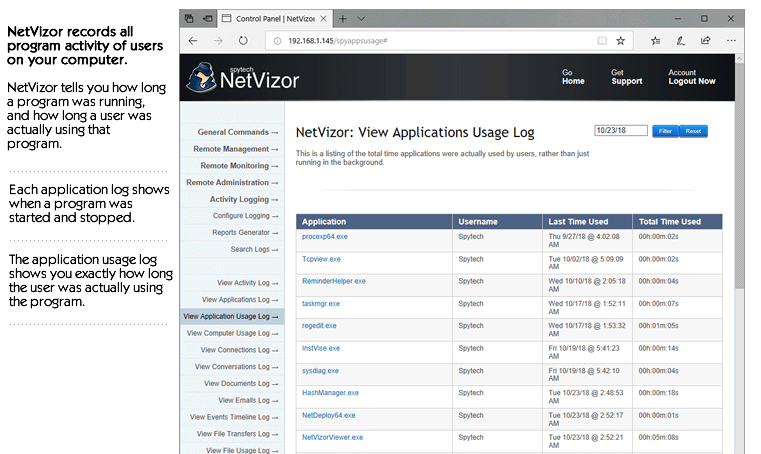
Monitor and log all applications ran by users - NetVizor logs when the application was started, stopped, and how long it was actually used. NetVizor also logs how long users were actually using each program.screenshot
- Website Activity
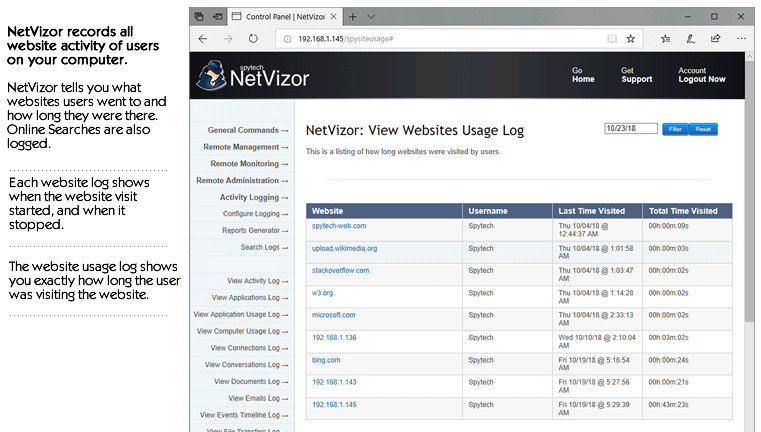
Log all website visits and online searches performed by the popular browsers used today. All website visits are logged by website address, username, and time of the site visit. NetVizor also logs how long users visit each website so you can easily see what websites are visited the longest. NetVizor supports the latest versions of the following browsers: Internet Explorer, Edge, Opera, Mozilla, Firefox, Flock, Google Chrome, Safari, Brave, and America Online. Incognito and InPrivate browser activity is also logged. screenshot
- Webmail and Website Content
Log webmail messages from most major webmail providers - such as Gmail, Yahoo Mail, and MySpace webmail. NetVizor logs incoming messages read by the user, as well as messages they send out through webmail. All website content visited can be logged as well.screenshot
- Internet Connections
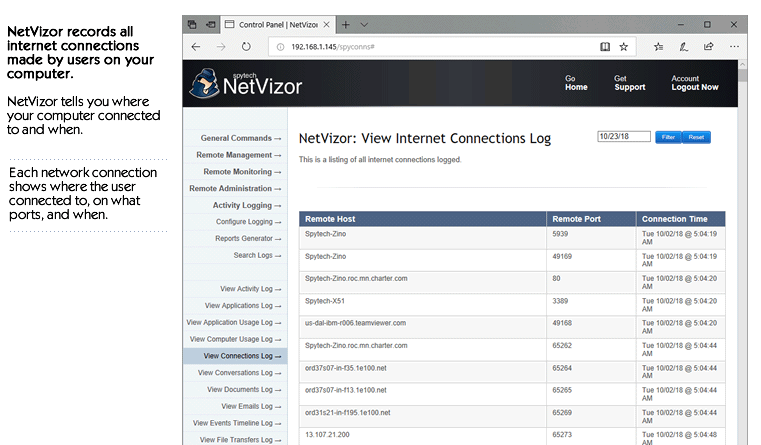
Monitor and log all internet sessions made on the PC. This includes all FTP,HTTP, POP3, Chat Messenger, and any other TCP connections.screenshot
- Internet Traffic Data
Monitor and log all internet traffic data that is sent and received by your computer. This data includes emails, website requests and contents, FTP sessions, passwords, chat conversations, and more.screenshot
- Files Uploaded and Downloaded
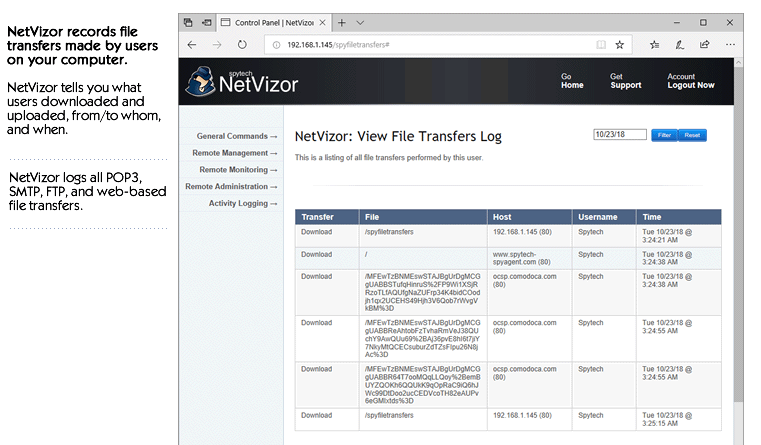
Log files users upload and download via the web, email, and FTP. All file transfers include the user that performed the transfer, where they downloaded from/uploaded to, and when. File transfer logs can be sorted by content-type for convenient log viewing.screenshot
- Documents Opened
Record documents and files opened and viewed by users.screenshot
- Print Jobs Executed
Record documents and files that are printed by users.screenshot
- File System Usage
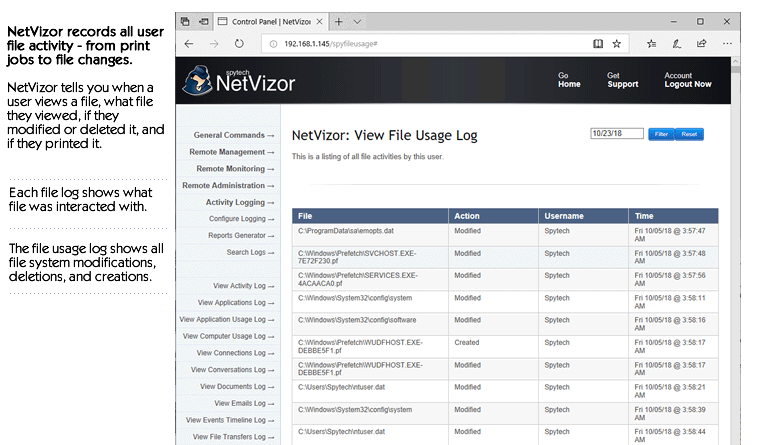
Log all file system activity. All file modifications, renames, creations, and deletions are logged by the time of the event, and the user who executed them.screenshot
- Screenshot Capturing
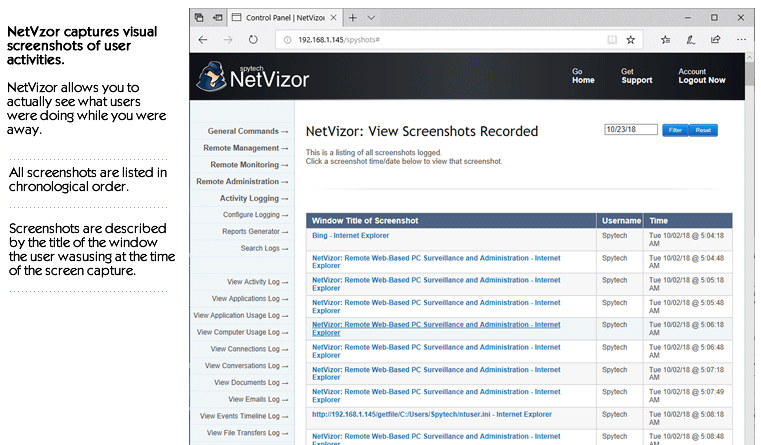
NetVizor can take snapshots of your desktop at set intervals of time, allowing you to visually see what is happening. The screenshot capture manager also has a built in slideshow viewer for easy viewing.screenshot
- Microphone Audio
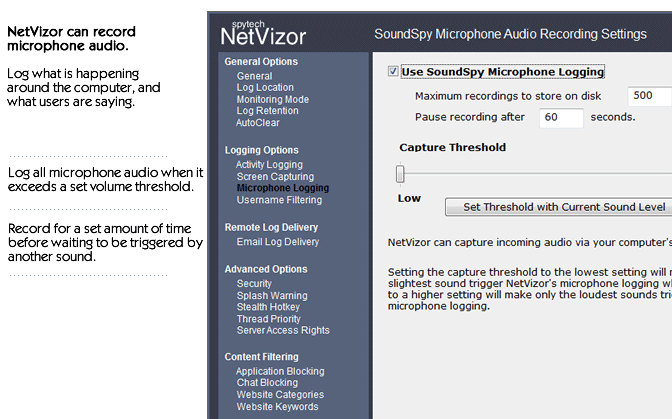
NetVizor can record microphone audio, allowing you to hear what users are saying, and what is happening around your computer.screenshot
- Window Activity
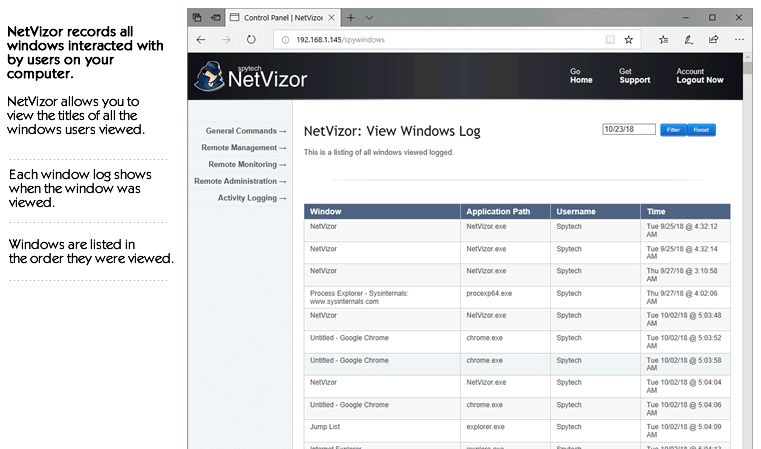
Log all windows in which the user directly interacts on the desktop.screenshot
- Software Installations
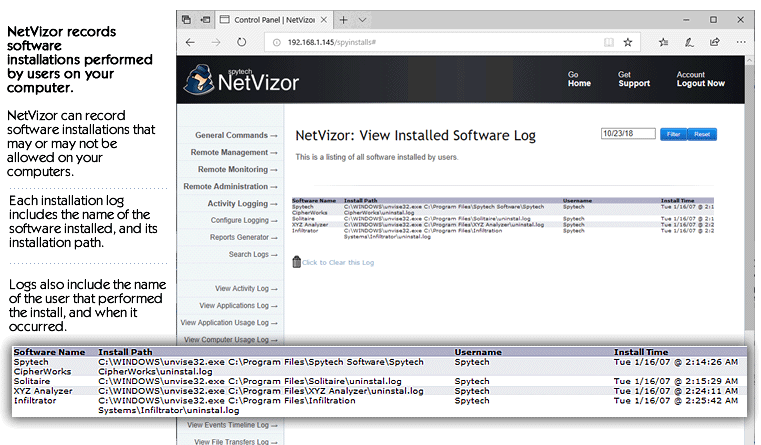
Record software installations performed by users - software name, installation path, and time of installation is logged.screenshot
- Mouse Clicks
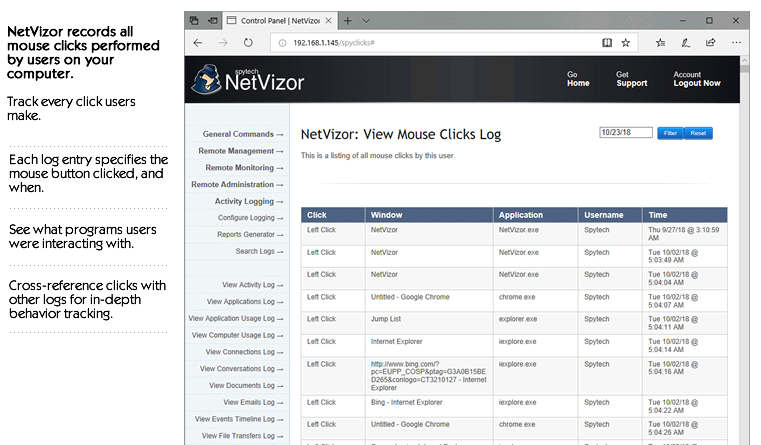
Record all mouse clicks performed by users. Logs include the window title and application path that the user clicked in.screenshot
- Remote Desktop Viewing
Grab screenshots of the remote computer's desktop - allowing you to see what others are doing on your PC in real-time!screenshot
- Password Logging
NetVizor has the ability to log all passwords used during monitoring sessions via its keystrokes recorder.screenshot
- Activity Logging
Log all all system shutdowns and user log-ons, as well as NetVizor actions: starting/stopping of monitoring processes, option changes, log accesses, and failed access attempts to start/stop monitoring.screenshot
- Remote System Information Viewing
View a listing of various system information for the remote PC, including processor type, system directories, and more.screenshot
- Remote Internet Connections Viewing
View a list of the current internet connections on the remote machine.screenshot
- Remote Recent Document History Viewing
View a list of the recent documents users have opened.screenshot
- Real-time Remote Monitoring
NetVizor allows you to remotely view what the user is doing in real-time - what windows are open, what applications are running, and more.screenshot
- E-Mail Log Delivery
Remotely monitor off-network computers by having recorded activity logs (excluding chat and email logs) emailed to your email address.screenshot
Guaranteed log delivery when combined with our Stealth Email Service!
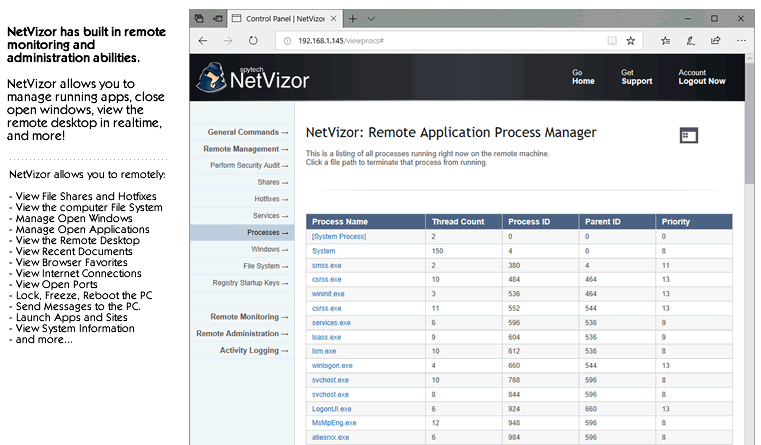
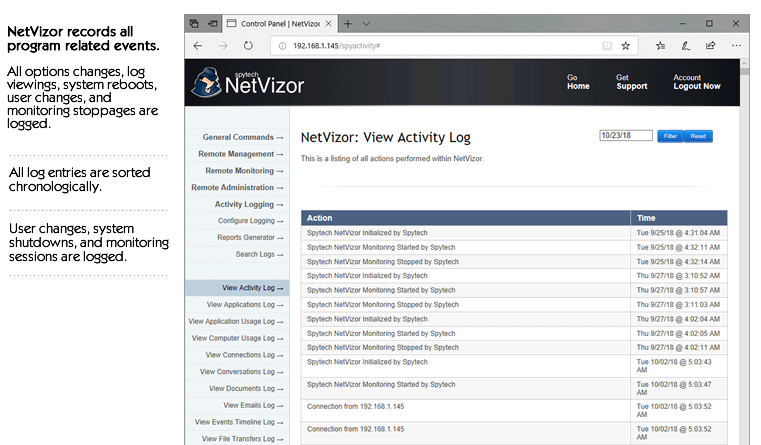
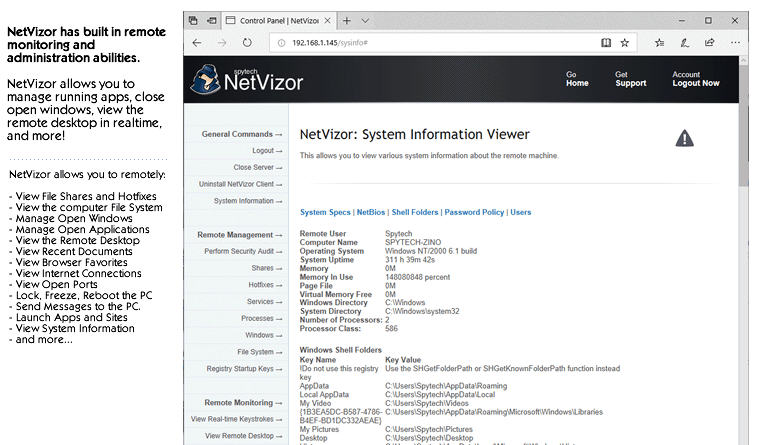
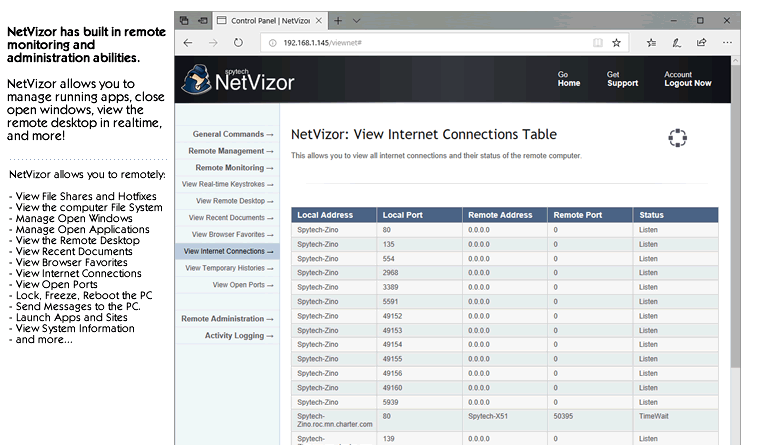
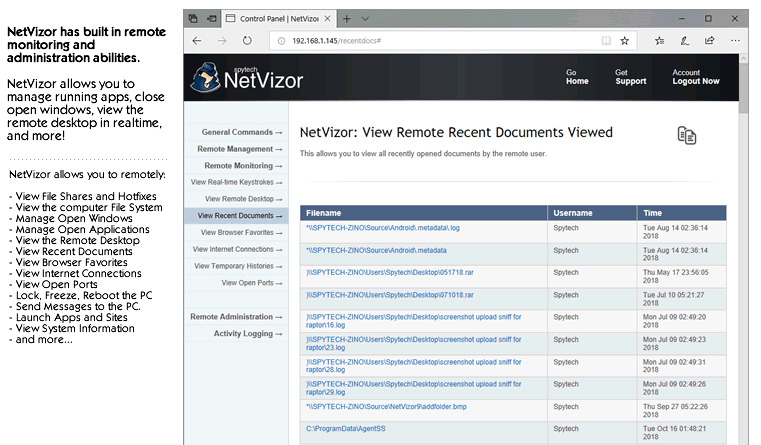
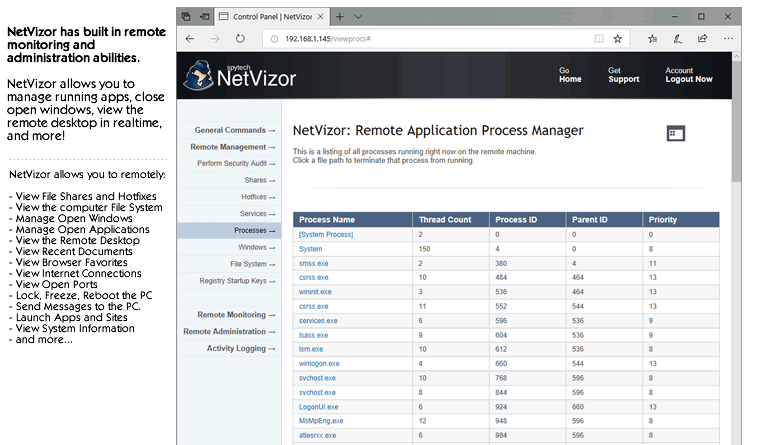
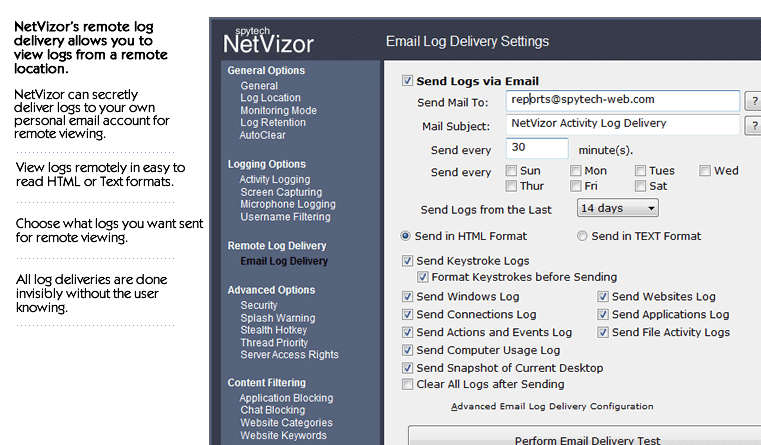
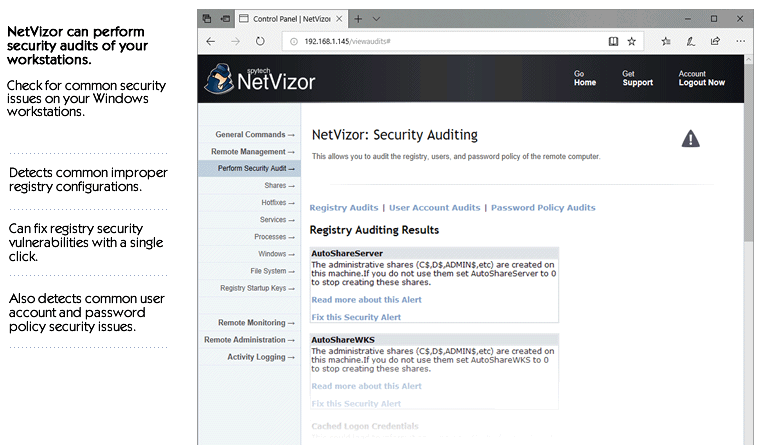
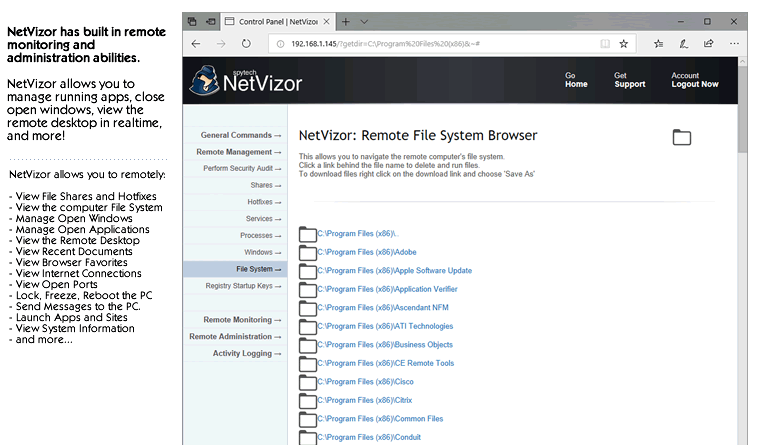
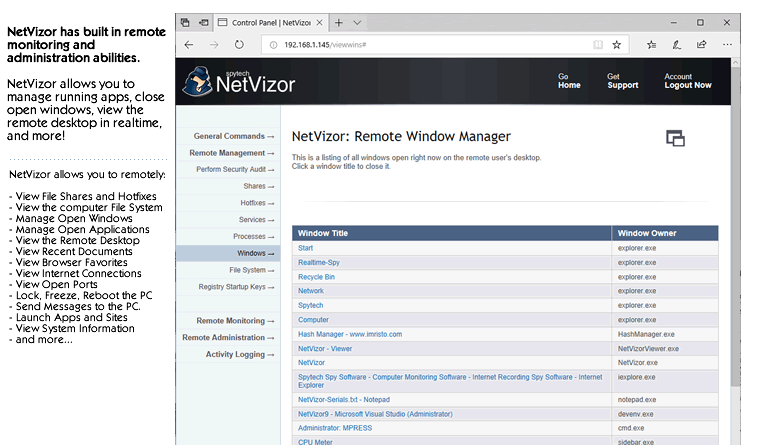
NetVizor has built in remote administration features that allow the administrator to remotely control remote workstations. NetVizor allows for remote workstation security auditing, remote application and windows management, file system browsing, system lockdowns, and more!
- Remote System Security Auditing
Perform a security audit on network workstations - NetVizor can audit the remote workstations password and user policies, as well as improper registry settings, file shares, and trojan/virus infections. Registry audits can be fixed remotely as well via the NetVizor web interface.screenshot
- Remote File System Navigation and Management
Browse and navigate the entire file system of the remote PC. The NetVizor remote file system browsing feature allows you to download, delete, and launch remote files - all through your web-browser.screenshot
- Remote System Lockdown Control
Lock and unlock the remote desktop from your web-browser! This allows you to keep users out of the remote PC, without ever having to be present at the PC.screenshot
- Remote Application/Task Management and Viewing
View all running applications on the remote PC in a convenient listing on your web-browser. Control and manage tasks by closing them with a single click.screenshot
- Remote Open Windows Management and Viewing
View all open Windows on the remote PC's desktop. Close the open windows with a single click! Now you can control what Windows the remote user can see.screenshot
- Remote System Mouse Freeze Control
Freeze and unfreeze the remote PC's mouse with a single click. Combine this feature with the Remote Lockdown command for powerful security and control of your remote PC.screenshot
- Remote Website Launching
Launch a website on the remote PC for the remote user to see.screenshot
- Remote Application Launching
Launch a program on the remote PC for the remote user to use.screenshot
- Remote Startup Registry Management
View and delete programs that automatically run when the remote computer is booted.screenshot
- Remote Message Display
Display a message for the remote user to read. This allows you to send warnings, or simple messages to the remote PC.screenshot
- Remote System Shutdown/Restart/Logoff
Shutdown, Restart, or Logoff the remote PC from your web-browser with NetVizor.screenshot
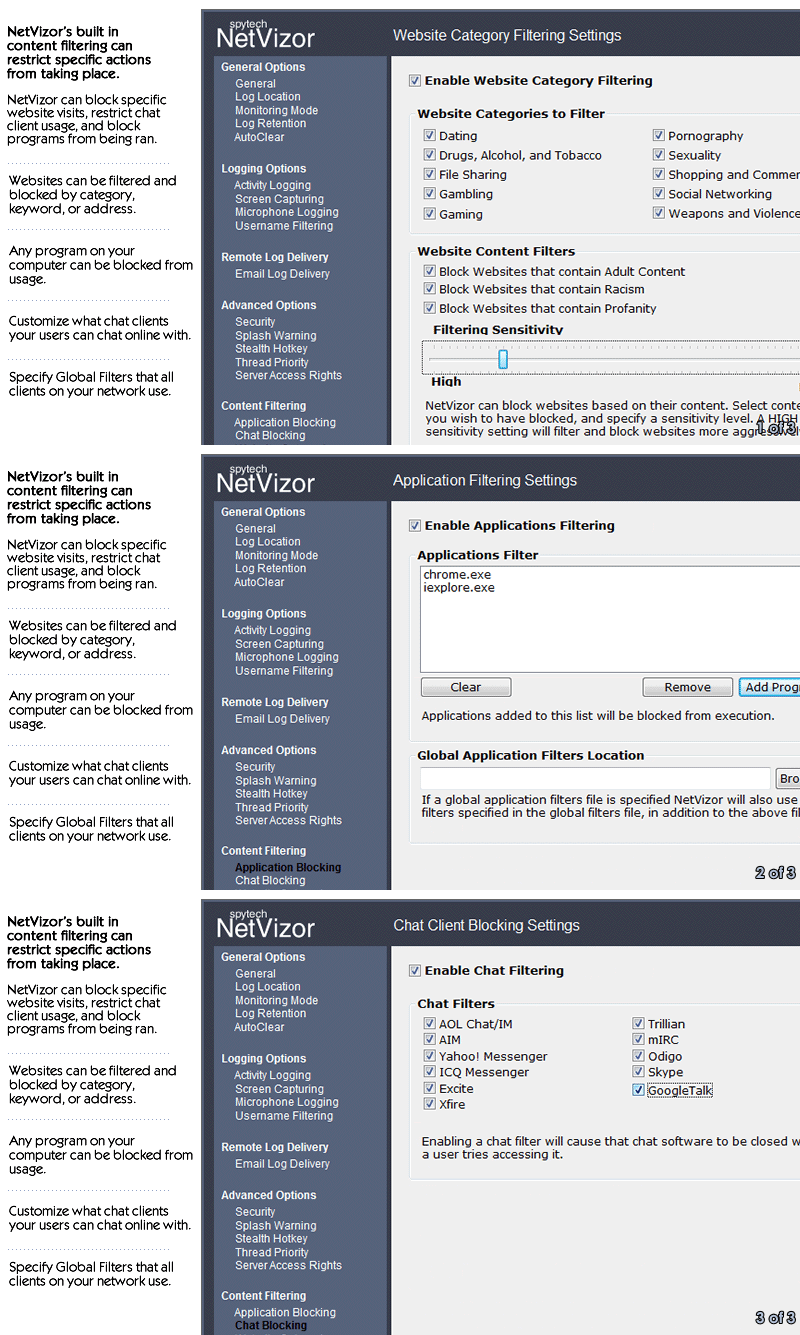
NetVizor not only acts as a powerful network monitoring and spy software solution, but also as a content filtering and activity alerting tool. NetVizor can filter websites from being visited, applications from being ran by the user, and even chat messengers from being used while NetVizor is active. Alerts allow you to respond instantly to unwanted behavior.
- Application Filtering
NetVizor allows you to control what programs users cannot run and logs when they try running restricted applications.screenshot
- Website Filtering
NetVizor allows you to control what websites users can and cannot visit. Block websites by specifying keywords and specific addresses, or by choosing from amongst 10 common internet website categories - such as dating, gaming, and pornography.screenshot
- Global Network-wide Website and Application Filters
NetVizor allows you to create website and application filters that can be applied to every computer on your network - instantly.screenshot
- Chat Filtering
NetVizor allows you to control what chat messengers users can and cannot use while NetVizor is running!screenshot
- Portable Drive and File Copy Blocking
NetVizor has the ability to instantly block portable and external drives that may be used by users to steal data off of your network. NetVizor can block users from copying files, preventing the theft of sensitive files.screenshot
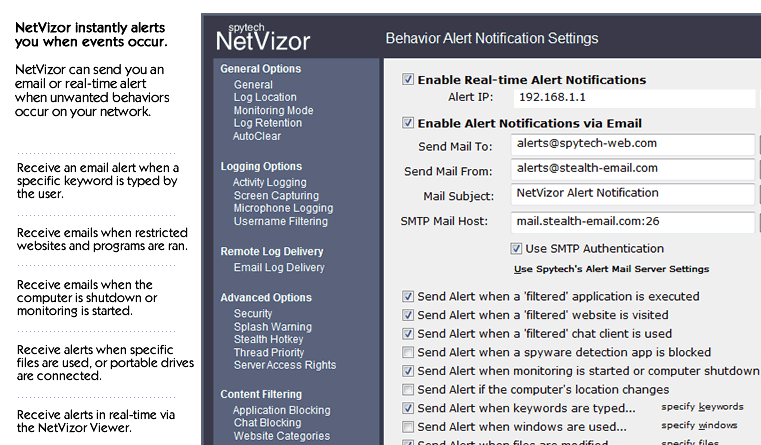
- Instant Real-time Activity Alerts
NetVizor can be configured to send you alert notifications in real-time when a user performs an unwanted behavior. Alerts can be displayed in NetVizor's central alerts manager as they occur, and/or you can receive alerts via email.screenshot
NetVizor can send instant activity alerts when:
•Unwanted Applications are Executed •Unwanted/Specified Websites are Visited •Chat Clients are Used •Portable Drives are Used •Computers are Started and Shutdown •Computer Locations Change •Specified Keywords are Typed •Specified Files/Folders are Modified
NetVizor can log just about every move a user makes - generating massive amounts of user activity information - so essential log management and reporting features are a must. To make log viewing and management a simple task, NetVizor has built-in Top 10 report generators, summary reports, log cross-referencing, filtering, and search features.
- Extensive Report Generation
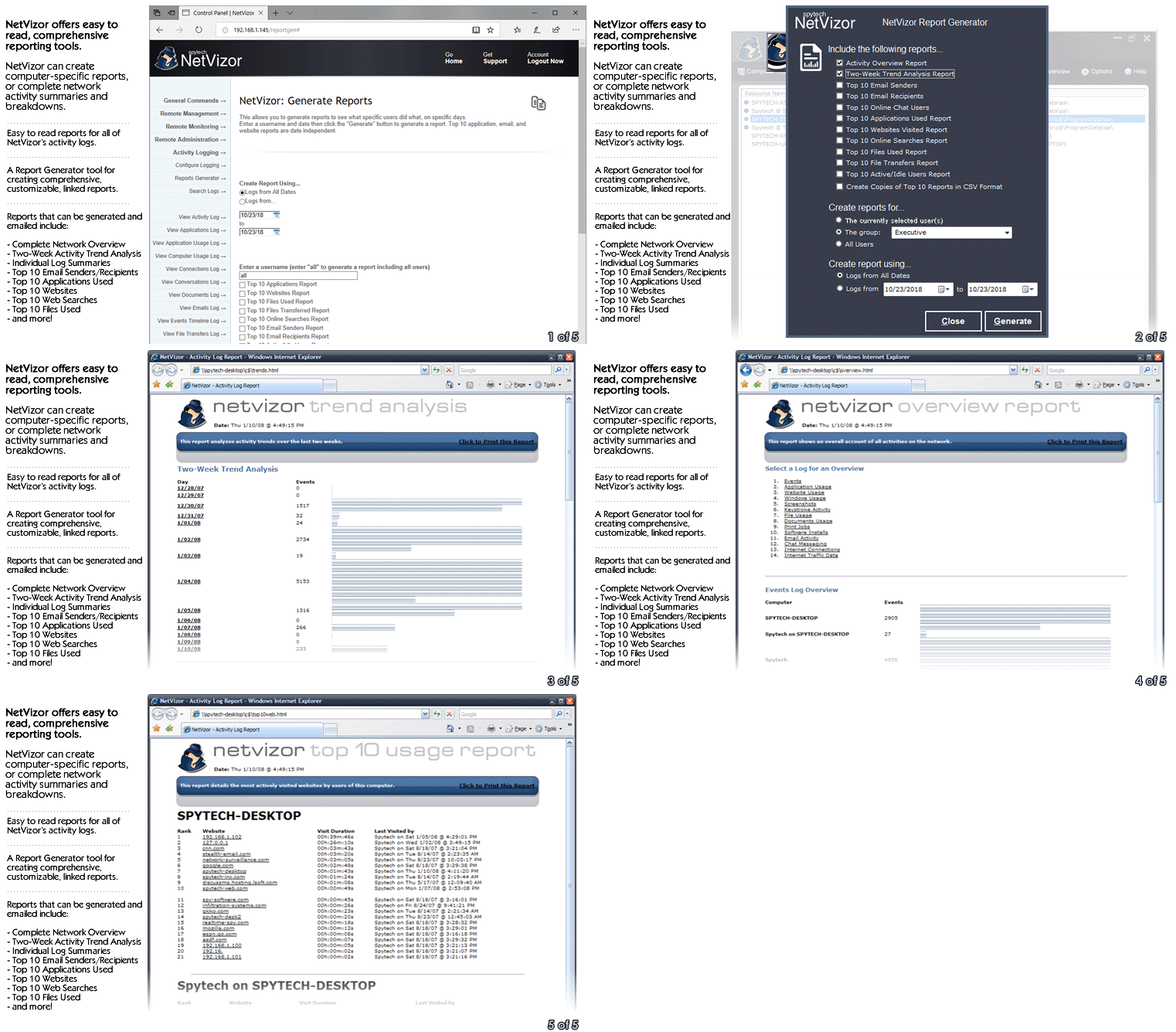
NetVizor's extensive and flexible report generation capabilities can create complete network-wide top 10 activity usage reports, network activity overview reports, trend analysis reports, and individual reports for each activity log. Reports can present activities on a network-wide scale, or for individual computers.screenshot
NetVizor can create the following reports:
•Network-wide Activity Overview •Two-week Trend Analysis •Top 10 Email Senders and Recipients •Top 10 Online Chat Users •Top 10 Applications Used •Top 10 Active/Idle Users •Top 10 Websites Visited •Top 10 Online Searches •Top 10 Files Used •Top 10 File Transfers •Bandwidth Usage •Individual Log Summaries - Remote Report Delivery via Email
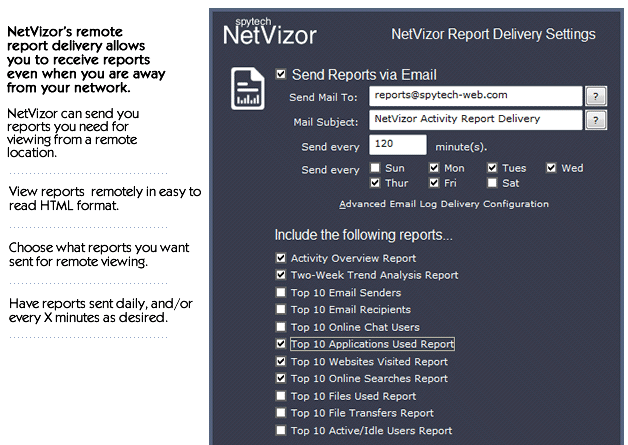
NetVizor's extensive network activity reports can be emailed to you on a daily basis so you can keep in touch with your network users' behaviors, while being anywhere.screenshot
- Log Cross-Referencing
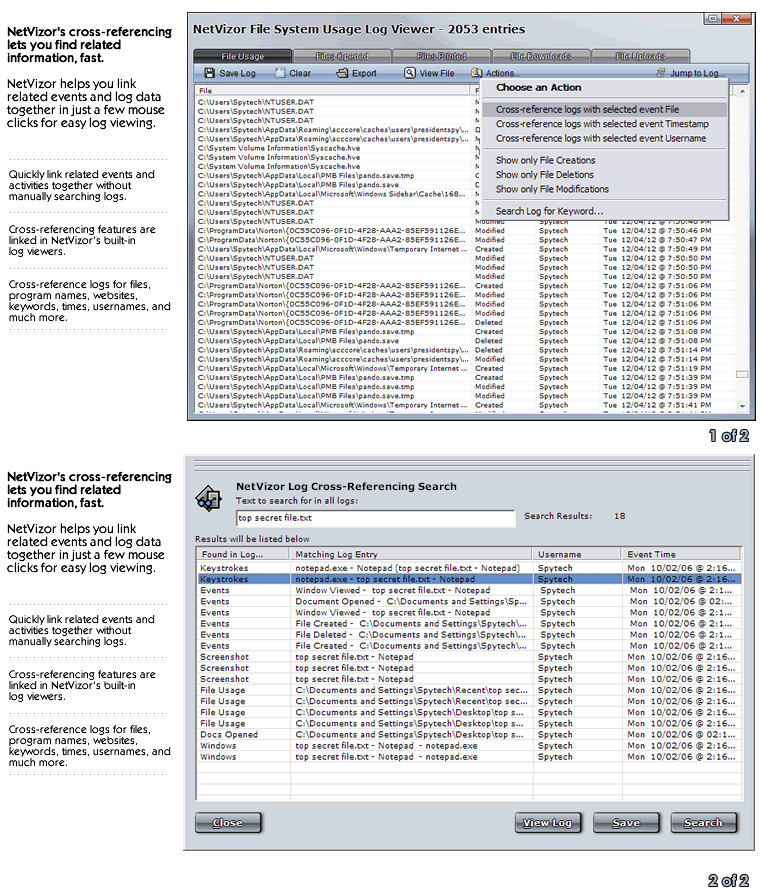
NetVizor's built-in cross-referencing features can link together relevant log data for easy and efficient log browsing with just a few clicks.screenshot
- Log Retention
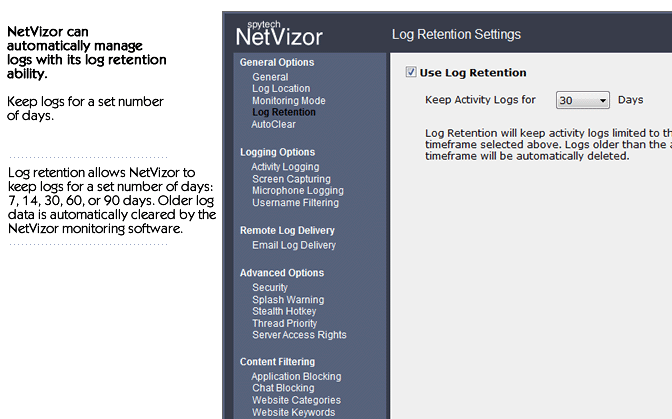
NetVizor can automatically clear log data older than a specified age, keeping log sizes manageable.screenshot
- Log Searching
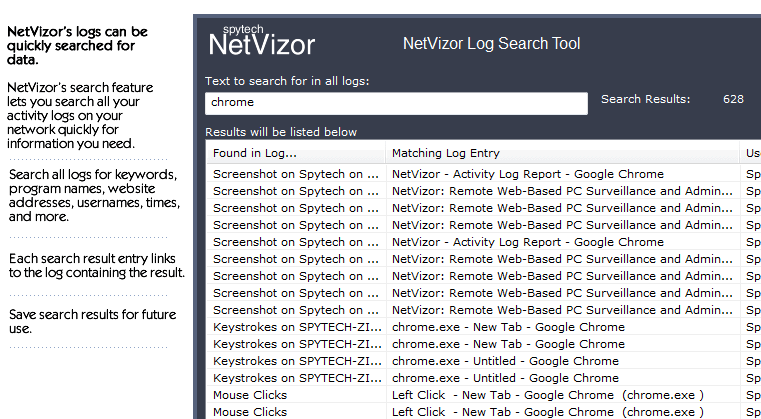
Quickly search a single user's logs, or all computer logs on your network for specific keywords that may be contained in NetVizor's logs.screenshot
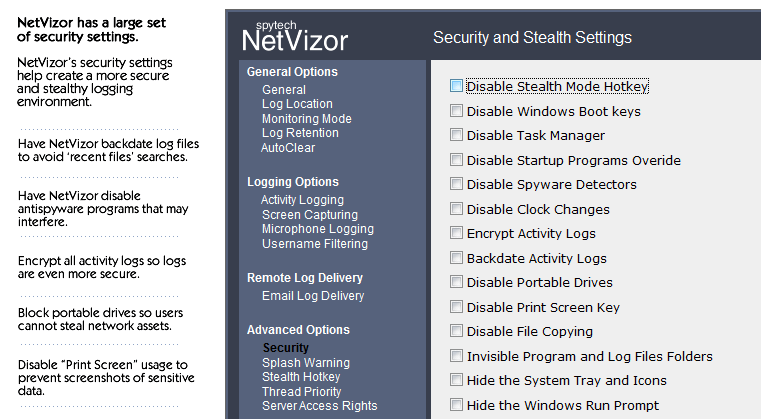
NetVizor has a large array of security and stealth features. NetVizor is undetectable under all Windows versions (it does not even show up in the task manager on any Windows platform) and can circumvent popular third-party "spyware" detectors. NetVizor has powerful lockdown and logging scheduling features, optional startup warnings, and much more.
- Stealth-Mode
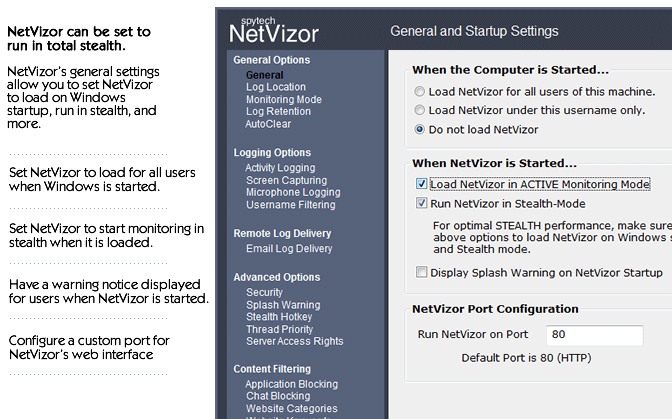
NetVizor can run totally in stealth; that is, it is virtually undetectable to the user. NetVizor will NOT show up in the task manager under Windows - at all. NetVizor does not appear in registry and Windows startup utilities while it is running, either.screenshot
- Log File Encryption
NetVizor has a built in encryption option that allows you to have all your NetVizor activity logs encrypted so others cannot stumble across NetVizor's logs or read them without using NetVizor's protected log viewers.screenshot
- Print Screen Blocking
NetVizor can block the usage of the 'Print Screen' key on your computer's keyboard, preventing users from taking screenshots of sensitive data.screenshot
- Logging Time Scheduling
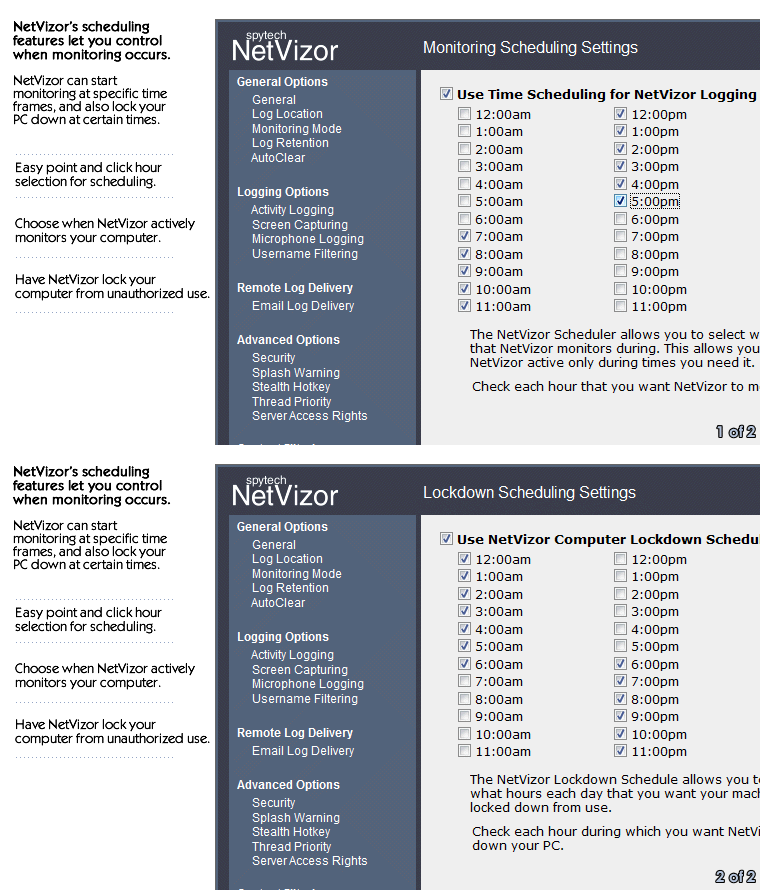
Configure NetVizor to monitor and record only when you want it to.screenshot
- PC Lockdown Scheduling
Schedule NetVizor to lock your PC down when you are not around.screenshot
- Warning Screen
Display an optional splash screen which alerts users they are being monitored by the NetVizor software.screenshot
- Password Protection
NetVizor is password protected to prevent easy monitoring termination and option changes.screenshot
- Active Startup
Run NetVizor automatically in active monitoring mode.screenshot
- Windows Startup
Run NetVizor automatically when Windows starts up.screenshot
- Idle Timeout
NetVizor will stop logging when the user is inactive for a specified amount of time, when they are active again NetVizor resumes logging.
- Log AutoClear
You can set NetVizor to clear your monitoring logs every xxx number of actions logged, when logs reach a specific size, or every xxx number of keystrokes entered. This provides for minimal usage of processor speed and disk space.
- IP Allowance Configuration
NetVizor allows you to specify a list of IP addresses that may access the NetVizor controlled remote PC. This allows you to restrict access to IP addresses within your local network, or to only certain static IP addresses.
- Access Restriction Configuration
NetVizor allows you to configure what remote options you can access through your web-browser. You can disable any features of your choosing.
- Invisible Program and Log File Folders
NetVizor can be configured to render its program and log file folders invisible so that users cannot come across them while using the computer.screenshot
- Log File Backdating
NetVizor can be configured to backdate all log files it creates so that they appear older than they really are. This will make it impossible for users to find log files by performing system searches for most recently modified files.screenshot
- Spyware Detector Disabling
Configure NetVizor to disable popular spyware detectors that may interfere or detect NetVizor running.screenshot
- Remote Uninstall
Remotely uninstall NetVizor from any computer or device via the NetVizor Viewer interface.
NetVizor has always been known as being extremely easy to use. You can have NetVizor setup and monitoring in seconds with its built in easy configuration wizard and intuitive graphical interface. NetVizor can even be tweaked to smoothly monitor slower PC's!
- Remote Network Installation and Removal
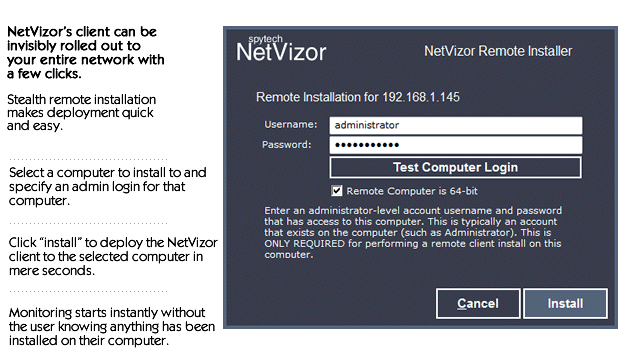
Network administrators can configure and deploy NetVizor invisibly over their entire network with just a few clicks, or remove it just as easily - from one central location! Network deployment can be completed in just a few moments.screenshot
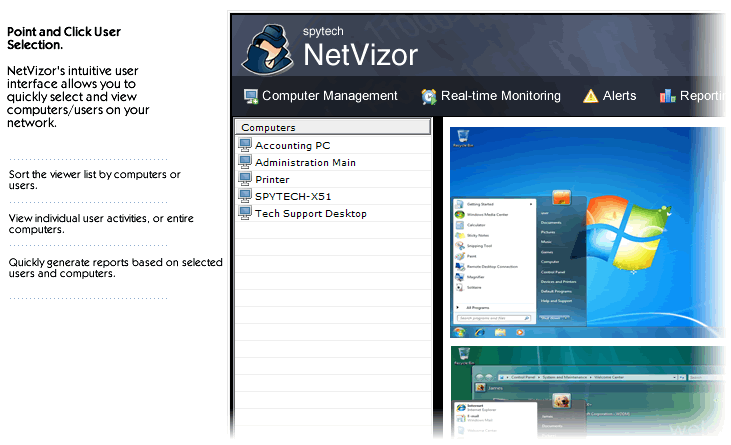
- Point and Click User Selection
Click and select any monitored PC OR User on your network via NetVizor's centralized viewing console.screenshot
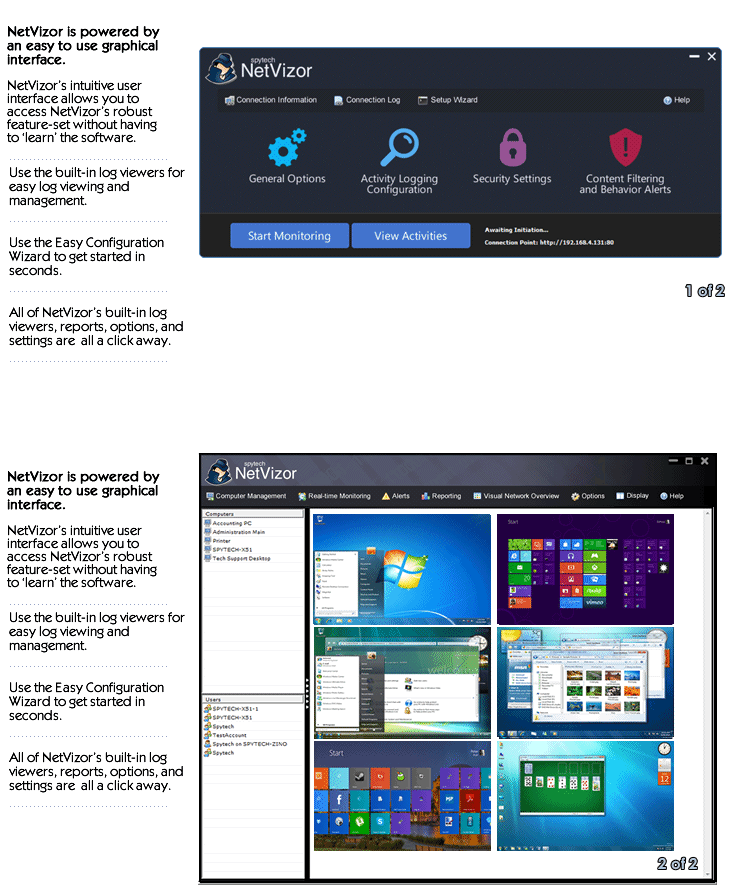
- Intuitive Interface
Crafted by over 15 years of market experience, NetVizor is powered by an easy to use graphical user interface with intuitive labeled buttons and icons.screenshot
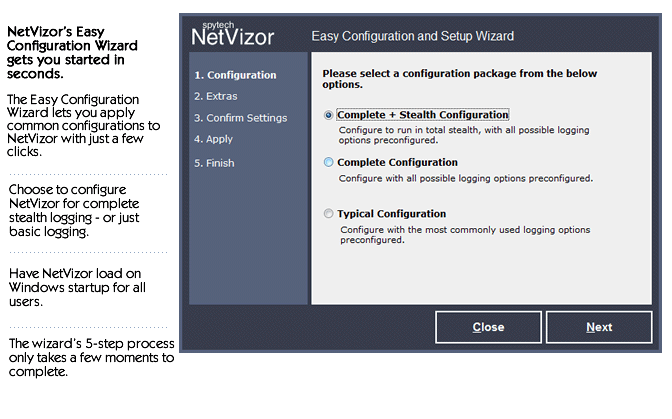
- Easy Configuration Wizard
Setup NetVizor in seconds with the built in easy configuration wizard.screenshot
- Windows NT4, 200x, XP, Vista, 7, 8, 8.1, 10, or 11. 32 and 64-bit supported.
- 3MB hard disk space
- Windows TCP/IP Network
- Administrator access is necessary for installation
- NetVizor can only be installed on computers you own and have authorization to monitor.
Purchase NetVizor today and start monitoring your network in minutes. Your download is available immediately after purchase so you can install and start using NetVizor right away!
Easy and Quick Installation.
Download & Install Immediately.